Friday, 11 October 2013

Android is Much More Secure than You Think: Google

Google up till now, has never came forward to justify the claims against its Linux-based operating system Android, that it is the most precarious Smart Phone based Operating System, and have over 1Milion High-Risk apps in its Play Store.
Ever since it was released publically in September 2008, dozens of proclamations and researches had been published professing that Android is not a secure platform for Smart Phones.
Google has ultimately broken the Ice, and despite the fact that Play Store has over 1Million Malware apps, Google claimed that, Android is more secure than any other platform, including iOS.
Google’s Android Security chief Adrian Ludwig; researcher Eric Davis and Jon Larimer at Berlin’s Virus Bulletin conference had laid out the engaging report with comprehensive demographic & analytical data, called “Android – realistic security from the ground up”.
The report manifested the engrossing illustration of the security dynamic in the open Android ecosystem. It was exhibited to dispute the pretenses of pervasive Android malware threats.
Here is an overview of one of the info-graphic shown by Google’s Security folks.
This picture is showing the multiple layers defense level that a user has to go through before installing an App.
clip image002 Android is Much More Secure than You Think: Google
According to Ludwig, the number of malware that actively strive to dodge runtime security checks in order to wreck users is surprisingly just 0.001% of installed apps. And these are the numbers that tries. The numbers of apps that really able to provoke harm are even scantier than that. Fascinating! Isn’t it?
Ludwig relates the Google’s strategy to control Malware as similar to the role, the Center for Disease Control (CDC) plays in public health.
“The CDC knows that it’s not realistic to try to eradicate all disease. Rather, it monitors disease with scientific rigor, providing preventative guidance and effective responses to harmful outbreaks”
Google evidently gathered data from apps that were installed from outside the Play Store and where the probability of malware and worms is much eminent.
Based on the data collected from 1.5 billion app installed from Outside, Google secured credible evidence that the proportion of “potentially harmful apps” installed is about 0.12%.
clip image004 Android is Much More Secure than You Think: Google

However, there is still one admonition to all these. Google’s statistics and data are determined from Android devices that have Google Play Store installed, with the feature of ‘Verify Apps’. No data had been collected from the Smart Phones and Tablets that have not been authorized to run Google Play services, especially those manufactured in China.

Saturday, 7 September 2013

Download Windows 8.1 (Blue) Preview - ISO's and Product Key (Free)

.::Overview::.

Search once. Go anywhere.

A single search now brings you results from your PC, your apps, and the web. See results in a clean, graphic view that lets you take immediate action and launch apps. Search, click, do. Find a song and start playing it, or find a video and watch it right away. Powered by Bing.
Search results in Windows 8.1 Preview

More Apps to Love

You’ll notice that the Windows Store has a new look which makes it easier to discover and download new apps. And the apps that are included withWindows 8.1 Preview let you do a bunch of cool things. For example, with Reading List you can save articles and stories across apps and devices, and the updated Photos app gives you fast and fun editing.

An app page in the Windows Store

Make it yours

Set up a slide show on your lock screen by picking your favorite pictures. Arrange the stuff on your Start screen so it's just the way you want it. Choose from more tile sizes, more colors, and more backgrounds—including animated backgrounds.
Personal photos displayed on a Windows 8.1 Preview lock screen

Built-in cloud storage

SkyDrive is now the default location for saving documents. So you always have your files wherever you go, even when you’re offline. And with the includedSkyDrive app, you can manage both local files and SkyDrive files in one place.

Fast, full-screen browsing

When you get Windows 8.1 Preview, you also get to check out the newInternet ExplorerInternet Explorer 11 Preview is built for touch, with faster load times, a full-screen experience that includes side-by-side browsing of your sites, and real-time info delivered on your Start screen through live tiles for your favorite sites.

--•Download•--

How to install Windows 8.1 Preview from an ISO file

To install Windows 8.1 Preview from an ISO file, you must first convert the ISO file into installation media stored on a DVD or a USB flash drive.
If you're using Windows 8, follow these steps to install Windows 8.1 Preview from an ISO file:
  • Download the ISO (.iso) file.
  • Double-tap or double-click the ISO file.
  • Double-tap or double-click setup.exe and follow the steps.
If you're using Windows 7, the easiest way to convert an ISO file to a DVD is to use Windows Disc Image Burner. On a PC running Windows XP or Windows Vista, a third-party program is required to convert an ISO file into installable media—and DVD burning software often includes this capability.

Important

If you decide that you want to install Windows 8.1 Preview using the ISO, you won't be able to uninstall it. If you decide to go back to your previous operating system, you'll need to reinstall it using the recovery or installation media that came with your PC, which is typically DVD media. If you're running Windows 8 and you don't have recovery media, you might be able to create a USB recovery drive. If you're running Windows 7Windows Vista, or Windows XP and you don’t have recovery media, you might be able to create it from a recovery partition on your PC using software provided by your PC manufacturer. Check the support section of your PC manufacturer’s website for more information. After you install Windows 8.1 Preview, you won’t be able to use the recovery partition on your PC to go back to your previous version of Windows.

Notes before you download

Windows 8.1 Preview is prerelease software that may be substantially modified before it’s commercially released. Microsoft makes no warranties, express or implied, with respect to the information provided here. Some product features and functionality may require additional hardware or software.

ISO files:-

Product Key: NTTX3-RV7VB-T7X7F-WQYYY-9Y92F


Language
Link to download

English 64-bit (x64)
 Download (3.8 GB)  

English 32-bit (x86)
 Download (2.8 GB) 

English (United Kingdom) 64-bit (x64)
 Download (3.8 GB)  

English (United Kingdom) 32-bit (x86)
 Download (2.8 GB) 

Arabic 64-bit (x64)
 Download (2.8 GB)    

Arabic 32-bit (x86)
 Download (3.8 GB)  

Chinese (Simplified) 64-bit (x64)
 Download (3.9 GB)   

Chinese (Simplified) 32-bit (x86)
 Download (2.9 GB)   

Chinese (Traditional) 64-bit (x64)
 Download (3.9 GB)    

Chinese (Traditional) 32-bit (x86)
 Download (2.9 GB) 

French 64-bit (x64)
 Download (3.8 GB)    

French 32-bit (x86)
 Download (2.8 GB)  

German 64-bit (x64)
 Download (3.8 GB)    

German 32-bit (x86)
 Download (2.8 GB) 

Japanese 64-bit (x64)
 Download (3.8 GB)    

Japanese 32-bit (x86)
 Download (2.8 GB)   

Korean 64-bit (x64)
 Download (3.8 GB)   

Korean 32-bit (x86)
 Download (2.8 GB)   

Portuguese (Brazil) 64-bit (x64)
 Download (3.7 GB)    

Portuguese (Brazil) 32-bit (x86)
 Download (2.8 GB)   

Russian 64-bit (x64)
 Download (3.7 GB)  

Russian 32-bit (x86)
 Download (2.8 GB)

Spanish 64-bit (x64)
 Download (3.8 GB)   

Spanish 32-bit (x86)
 Download (2.8 GB)   

Swedish 64-bit (x64)
 Download (3.7 GB)    

Swedish 32-bit (x86)
 Download (2.7 GB)   

Turkish 64-bit (x64)
 Download (3.7 GB)   

Turkish 32-bit (x86)
 Download (2.7 GB) 


Thursday, 5 September 2013

Android users finally Reached 1 Billion Devices, Next Version Name: KitKat


Android chief Sundar Pichai has announced via Google+ and Twitter that the long-awaited moment of Android’s 1 billion activations has finally arrived. After such a milestone, Google’s stronghold over the market has probably become unmatchable.
“All this Android innovation is driving tremendous ecosystem momentum and I’m excited to share that together we’ve now passed 1 Billion Android device activations”, he wrote. “Huge thanks to the entire Android community from the hardware manufacturers, chip makers and carriers to the developers and content creators to all of you – our Android users around the world – for making this possible.”
He also made full use of the moment to tease the next version of Android which has found a new name in “KitKat”, rather than the name Key Lime Pie which circulated around the web for months before being turned down.
“On my return from Asia, I was also thrilled to find this guy waiting to greet me on the front lawn — love the new #AndroidKitKat statue and can’t wait to release the next version of the platform that is as sweet as the candy bar that’s one of our team’s favorites.”
Yes, KitKat is named after the popular chocolate and Google has secured rights to that too. The OS name skips the space between the two parts though.
An official section has been dedicated in the operating system’s official site already with a simple message accompanying it:
It’s our goal with Android KitKat to make an amazing Android experience available for everybody.
And oh, a new statue has joined the existing statues of Android versions in GooglePlex already which looks just as mouth-watering as the older ones. Google has once again followed its famous tradition of naming OS versions after desserts in this instance.

Android KitKat

Prepare for a sweet new treat

Android is the operating system that powers over 1 billion smartphones and tablets. Since these devices make our lives so sweet, each Android version is named after a dessert: Cupcake, Donut, Eclair, Froyo, Gingerbread, Honeycomb, Ice Cream Sandwich, and Jelly Bean. As everybody finds it difficult to stay away from chocolate we decided to name the next version of Android after one of our favorite chocolate treats, Kitkat®!
To make this release even sweeter, Kit Kat is giving you the chance to win a Nexus 7 or Google Play credit. Just look for specially branded Kit Kat candy bars featuring the Android robot in a store near you.

Tuesday, 3 September 2013

Breaking: Microsoft Buys Nokia Devices Unit for $7.2 Billion

Microsoft and Nokia have just announced that both companies have decided to enter into a transaction whereby Microsoft will purchase substantially all of Nokia’s Devices & Services business, license Nokia’s patents, and license and use Nokia’s mapping services.
Under the terms of the agreement, Microsoft will pay $ 5 billion to purchase substantially all of Nokia’s Devices & Services business, and $ 2.2 billion to license Nokia’s patents, for a total transaction price of $ 7.2 billion in cash.
Microsoft will draw upon its overseas cash resources to fund the transaction. The transaction is expected to close in the first quarter of 2014, subject to approval by Nokia’s shareholders, regulatory approvals and other closing conditions.

Nokia has outlined its expected focus upon the closing of the transaction in a separate press release published today.

Saturday, 31 August 2013

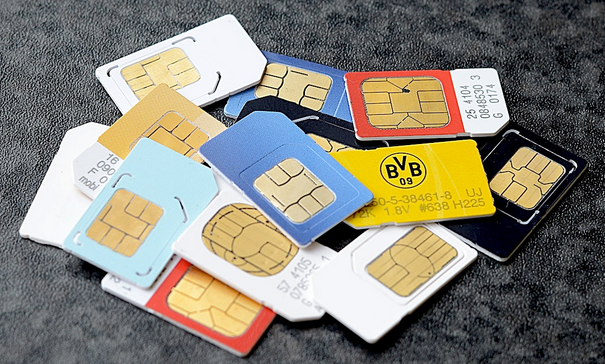
GSM SIM Card is Finally Hacked, Puts 750 Million Users at Risk

The SIM was one of the few common things in tech which were considered impossible to hack. Until now. Karsten Nohl of Security Research Labs (based out of Germany) has finally got a way past the 56-digit unique code and found a simple process which leaves an estimated 750 million SIM cards at risk.

The research was done on a 1000 SIM cards and only the ones which were using the old DES (Data Encryption Standard) standard were found vulnerable. Cracking them is super-easy and takes just 2 minutes. A message is sent to the target SIM card while disguised as the carrier. In response, a message is received containing information needed to find a way past the 56-digit code or the digital key which can allow the hacker to take control of the target SIM.
After getting this information and taking control, the intruder can easily listen to your calls, send text messages and in short, have control over every form of data on your SIM card.
Mr. Nohl said:
“We can spy on you. We know your encryption keys for calls. We can read your S.M.S.’s. More than just spying, we can steal data from the SIM card, your mobile identity, and charge to your account.”
In all, about 25% of the SIM cards which were tested were found susceptible to such penetration. Newer technologies like NFC might be at risk too.
D.E.S. encryption, which is vulnerable to such hacks – is used on about half of the about six billion cellphones. Over the past decade, most operators have adopted a stronger encryption method, called Triple D.E.S., but many SIM cards still run the old standard.
The GSM Association hasn’t confirmed this just yet though as it will investigate the case first but if this, in any way is true, it will pose some serious threats to people using SIM card for much more complex purposes than calling and texting. Mobile payments that is.

Friday, 30 August 2013

Notepad++ : A free text/source code editor

About:

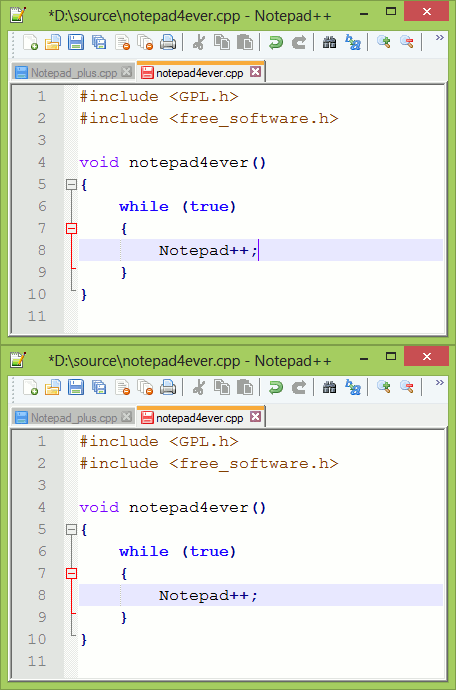
Notepad++ is a free (as in "free speech" and also as in "free beer") source code editor and Notepad replacement that supports several languages. Running in the MS Windows environment, its use is governed by GPL License.


Based on the powerful editing component ScintillaNotepad++ is written in C++ and uses pure Win32 API and STL which ensures a higher execution speed and smaller program size. By optimizing as many routines as possible without losing user friendliness, Notepad++ is trying to reduce the world carbon dioxide emissions. When using less CPU power, the PC can throttle down and reduce power consumption, resulting in a greener environment.

Screenshot

Features :


Update over The Ban on SMS and Call Packages: Voice and SMS Packages to Continue, Only Chat Rooms to End


images Update: Voice and SMS Packages to Continue, Only Chat Rooms to EndIt appears that the telecom sector was yesterday stormed with the biggest ever mis-understanding, as a directive coming from PTA ordered telecom operators to dis-continue Voice and SMS Packages. Same was interpreted by media and the telecom operators with whom we had confirmed the directive.

However, it is now emerging that that only voice and SMS chat rooms are to get blocked, and the usual SMS bundles and voice bundles that telecom companies offer are going to remain intact.
This mis-understanding was spread across the telecom industry as we had spoken with at least a dozen telco officials who were equally shocked at the decision.
PTA’s yesterday letter which clearly read “Packages Offered by CMTOs Contrary to Moral Values of the Society” is now asked to interpret as chat rooms that are offered by cellular companies, with which their customers could chat anonymously with other subscribers.
While there was no mention of chat rooms in the letter, the term used as chat packages is apparently what had confused everyone.
Telco officials have confirmed ProPakistani that they have received verbal communication from PTA about the issue and it is likely that PTA will issue a follow-up directive or a clarification later today.
A telco official said that they still think that SMS and Voice bundles are to be stopped, unless there comes a new directive clarifying the situation. He said that PTA must had used the term “Chat Rooms” instead of “Chat Packages” as this is how telcos advertise the offering.
Furthermore, Chat Rooms are offerings, not packages and should have been termed accordingly, the official concluded.
We will update this story as soon as we receive the clarification from PTA, or any development on the story.

BlueStacks App Player - Run Android Apps/Games on Windows PC or Mac with BlueStacks App Player

BlueStacks App Player

BlueStacks App Player lets you run apps from your phone fast and fullscreen on Windows and Mac.
Over 5 million people around the world use top apps like Angry Birds Space, Kik Messenger, Where's My Water and more on their laptops with BlueStacks. It took 10 engineers two years to build the complex "LayerCake" technology that enables this to happen – but you get to experience it free while in beta. You can download App Player now at BlueStacks.com


"Overall, the integration with Windows via a simple desktop gadget proved to be clean and seamless." - CNET

"Finally! Now You Can Get Thousands of the Best Android Apps on PC." - Business Insider